Here is a look at my second hackathon project, seebtc. Jorge, Julian and I ended up winning a prize from one of the API sponsors, ChartIQ. The ChartIQ guy was impressed with how deep we got into the ChartIQ code to enable live streaming of our own data. We are using a Node.js server with an Express framework. We are using web sockets and socket.io to connect to two APIs, MtGox and Blockchain. From MtGox we was receiving every bitcoin trade from their site, and from Blockchain we are receiving every bitcoin transaction that takes place from their site. We are saving the trade data to a MongoDB database using the Mongoose ORM and creating candlestick bars every minute with the trade data. We only have 1 view, a dashboard showing the ChartIQ graph with updates every minute, tweets about bitcoins using StockTwits, and a map of the world showing where people are spending bitcoins. Most of this is covered in the video. If you have any questions, feel free to reach out.
Cheers,
Kyle
P.S. We currently have this up on cbtc.herokuapp.com but will be running out of space in our MongoDB database soon and will either have to clear the database or take the site down.
Here is a look at my Mobile Payments Hackathon project from back in October, which I call Formation. Jorge, Julian and I built a rails app which uses NokoGiri to web-scrape a Google form and append a Stripe payment. The idea is to allow people to add payments to their Google Forms. Most of this is covered in the video. If you have any questions feel free to reach out.
In the field of web development, I have 3 interests.
Big Data
Creating “native desktop” web apps
Bridging the gap between the real world and the digital world
ChitChat.js is my first attempt to pursue the last interest.
I initially conceived ChitChat.js as a way to mimic a person’s experience in the physical world. When we change physical locations and the people around us change locations, the people who we can actually speak to changes. If Bob and Steve are both in Starbucks, they both know they are in Starbucks and have the ability to communicate with each other while in Starbucks. On the web, people are rarely aware that they are sharing a similar experience as another person at the exact same time. Millions of people are on Amazon.com at any moment but it’s still primarily a solitary experience.
Enter my concept for ChitChat.js V1: A Google chrome extension that lets you know which of your Gchat friends are on the same site as you at the same time. Maybe a video is going viral and Steve and I are both watching it at the same time. We should be talk about it. This is similar to running into a friend in a store or at the movies. Sharing experiences make them more meaningful. In the end, I did not pursue this idea because the intersection of people who would a) have a Chrome extension installed, b) be on a particular site and c) find a friend with both requirements seemed hard to grow.
However, Facebook, GMail already have real-time chatting capabilities. If other sites began adding chat capabilities, the web would begin to feel more like the real world. Enter ChitChat.js V2. ChitChat.js is an open-source chat bar client and node.js server that you can easily drop into any website. I attempted to model my implementation after Disqus. Installation is simple: there is one global variable ‘ChatterApp’ which name spaces all but two ChitChat.js variables and functions. A developer who wants to add chatting capabilities to their site need only add a script tag to the pages where they want chatting available and then trigger a ‘SetUsername’ function when a user logs into the site. This project is open source so the developer is responsible for setting up their own node.js server, but I have written instructions to make this setup as painless as possible (pretty much three-line install to Heroku). If people want this but don’t know how to setup the server side, feel free to contact me and I can help with hosting.
How it Works
ChitChat.js runs a node.js server, uses socket.io to create real-time chatting, uses require.js to asynchronously and modularly load your JS, and currently has no database requirements. Its only dependency is JQuery. When a user comes to a site running ChitChat.js, they are initially given a cookie and instantiated on the node server. If they login, the site will trigger ‘chatterApp.setUsername,’ which will let the node server know that the user with the specific cookie has logged in. The node server will then send down the current state of ChitChat.js.
To create separate chats between two users I am using Socket.io’s extremely helpful concept of a room. This allows a socket to only emit to a specific subset of sockets, i.e. the users they are sending a message to. When a user travels to a new page on the site, they will first disconnect from their socket connection and then reconnect with a new socket. On successful socket reconnect, the node server will send up the current state of any chats the user has open and all chat history. When a user leaves the site, they are removed from the list of logged in users on the site and this information is sent out to all logged in users.
This is definitely a work in progress. There are a few known issues which I would like to fix soon:
Currently a user can create multiple rooms (chat windows) with the same person
Users can minimize a chat window or the list of logged in users, but when they navigate to a new page, chat window state is not reproduced
Code for user logout but staying on the site has not been written
Currently, users are removed when they leave the site but there are no methods written to garbage collect rooms without any logged in users
Eventually I would like to add the functionality to support multiple sites on 1 node server. Socket.io has an interesting concept of name-spacing which could be useful but I might end writing my own code to handle this
Add database support
Screenshots:
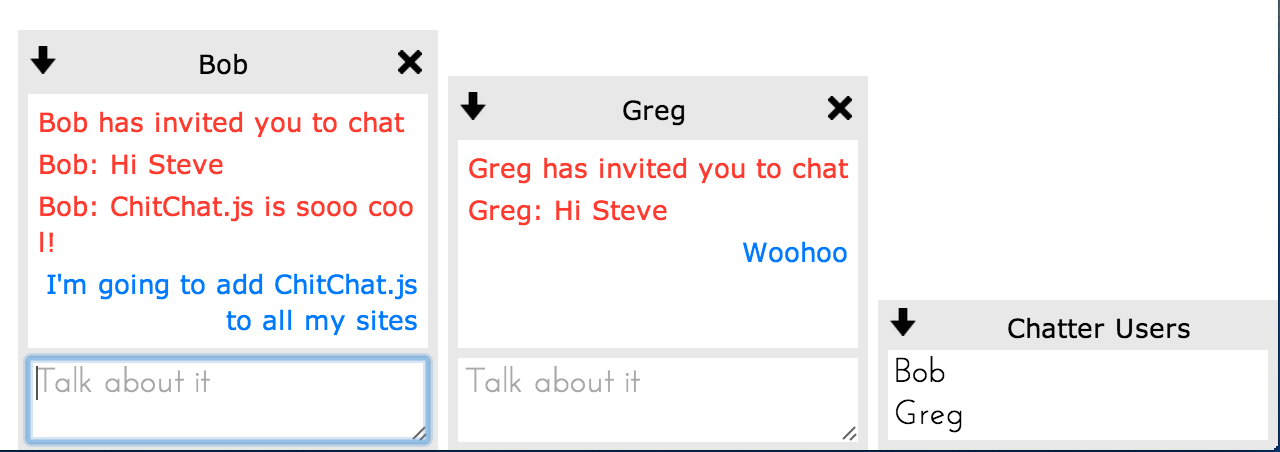
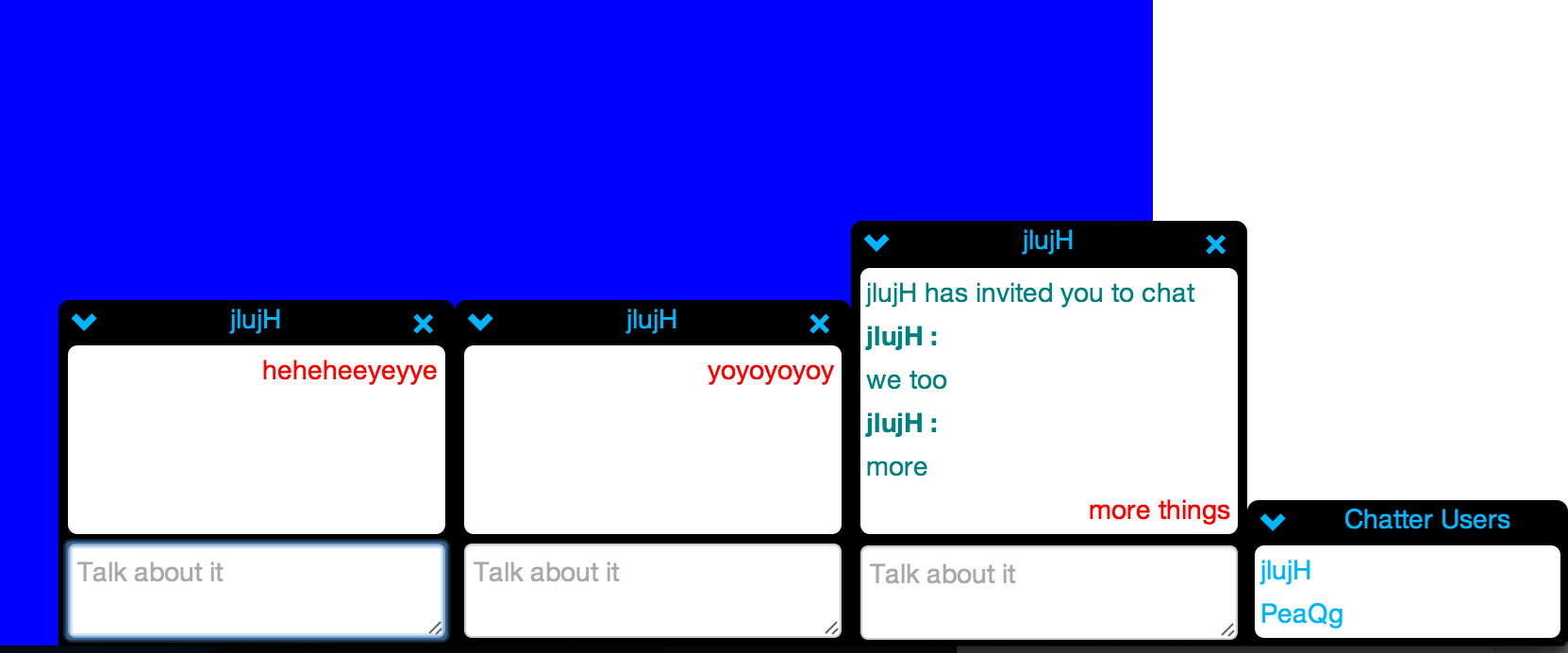
This is the default look – I was inspired by a retro AOL Instant Messenger but it’s easy to modify the look using CSS. Instructions are in the Github repository.
Let me know if you use this on your site, would love to see this kind of functionality on more sites that I visit. Also, would gladly work with anyone on Pull Requests if you’re interested in contributing!
This week flew by. Fastest week so far. I’m in the mood for an in depth reflection, so for the non-techies out there, put your skim goggles on.
Last Saturday I took some steps backward with ChatterJS and began forming classes and providing some structure to the app. The most important or distinguishable feature in my app is that the conversations persist as a user moves around a website. Last week, I was using the socket which is established when a user navigates to the site using ChatterJS as the base unit. When a user navigated to a new page, the socket is disconnected, and a new socket is established. Because was not a dependable source of truth, I could not rely on socketIO’s structure for my chatting app. Instead, I created a User class (which seems obvious in retrospect). The class gets the username, and potentially other useful information from the site the user is visiting. When the user logs in the site triggers a login function to my app, which lets the chatter app know to open the chat to the logged in user. I then assign the user an id on my node server and add the id as a cookie to their browser. The user class, along with a username and id, also has a socket and a list of rooms they are currently chatting in. SocketIO has an extremely useful rooms concept, which enables you to add sockets to a room and then send messages only to the specific sockets in that room. Last week I could only create one giant room, which was the whole app. The socketIO room, while useful, was not structured exactly how I wanted it to be, so I created a Rooms class. A room has a list of user ids, a list of messages, and an id. The room id was also stored in the User model and I used as the room name to emit messages from. I also created a simple Message class which had information about each message sent, username, user id, and text. The users and rooms are stored in a UserCollection and RoomCollection respectively. These collections are stored in a global ChatterApp variable on the server side. By creating these classes, I began to map my logic out into models separate from the app.js file which began acting like a controller. On the client side, I split my logic into a model/receiving controller and a view/sending controller. I’m not completely satisfied with my client side approach yet. I am still cluttering a few pieces together. Currently I am using requireJS to collect all my separate javascript files into one large file to send to the client. As a result, I’ve taken some creative measures to get my two files to play nice with each other.
Currently I am able to login in multiple users, see the logged in users in the users list, click on users to open chats with them, chat with the users, leave a chat, and get notified when a user leaves a what. When a users navigates to a new page (which I am simulating by refreshing the page) all information, logged in users, open chats, and messages, are all reloaded on the new page. And because I am using node and sockets everything is wicked fast. I’m also not using a database right now, which actually wouldn’t change too much because its a node server, but I’m probably saving myself from some crazy timing issues by forgoing a database.
My next steps are to broadcast updates to a user’s status when they navigate to a new page or interact with the app. Active users could be green, idle users, yellow and so forth. Currently rooms can only have two users, but I would like to make it so multiple users could be in a room. I’ve stalled on this because I can’t decide how the UI of adding a third person to a chat should look. The app isn’t Mozilla compatible right now, but this should just be a quick CSS fix. The chat widgets currently are in line with the rest of the HTML on the page but I would like to raise the z access on all the chat pieces so that html on the page will not be affected by adding the chatter app (I do have a slide down effect to allow users to hide chatter if they don’t need it at some point). And lastly, my current design makes a large assumption that the chatter app is only running on one website. This will probably require a big fix where I rework the code to namespace every user and room with the current url. This functionality is provided to socketIO so it won’t be terribly difficult, but definitely a process. Hopefully I can finish this up in the next few days so that I can move on to P2, ‘big-little matchmaker’, where I will move back into the wonderful world of ruby on rails and hopefully get some major experience working with backbone.
Until next time,
Kyle
p.s. the app name is temporary, let me know if you come up with anything better
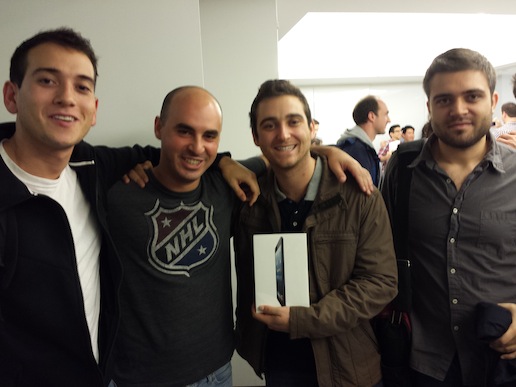
Hey folks sorry I missed you last week. Things got a little hecktic. Why you ask? Well last week Jorge, Jullian and I competed in our second hackathon. And I am happy to say that we took home a prize!! This hackathon was called Fintech and was focused on financial technology. The hachathon took place over the course of two days. We started Saturday morning and present Sunday afternoon. Julian use to be a trader so he had a good idea about what the financial sector did and didn’t want and as such he took the lead in our team. We settled on building a bitcoin dashboard. The dashboard had real time trade data from mtgox, the largest bitcoin trade market, real time transaction data from blockchain, and tweets abotu bitcoin from stocktwits. We saved the trade data to a mongoDB database and created 1 min candlestick bars using chartIQ. We saved the transaction data to the mongo database as well and took the amount of bitcoins and the ip address( when avalible) to show where bitcoins were being spent around the world. Jorge found a really cool map which would show pings. We put pings at each location where bitcoins were sent from and adjusted the size of the ping to be relative to the amount of bitcoins spent. The core of our design and issues were using the chartIQ graphing API. Once data is given to chartIQ, chartIQ gives you a bunch of really cool analytics functions for your graph. This was the impetus for using chartIQ. During the event, we worked closly with the representative from chartIQ as we ripped apart thier demo graph to load our own real time data. We worked till 4:30 AM on Saturday night and got really stuck getting the data into the graph. We planned to meet back at the hachathon at 8:30 AM to fix everything. If we didn’t we wouldnt have anything to present. Becasue I live so far away I didn’t get to sleep till 6 AM. And, suprise, I did not make it to the hackathon at 8:30. I rolled out of bed at 11:30, semi well rested and join my teamates who were less than pleased with me. My bad guys. Thakfully they were able to ge the data coming into the graph. At 1 groups began presenting. There were 4 judges, all of whom were venture capicalits foucused on financial technology. The judges RIPPED apert the first few groups. They asked tough tough questions about the core business ideas of the product. And we were kind of freaking out. We didn’t have a business idea! Heack, the word dashboard hadn’t been in our head until an our before the presenations started. We were just building to build. So finally we are up next and no one wants to present. Our app hardly worked (the map had disappeared off the dashboard), we were exhausted, and had no business plan. And then the event organizer called our group, and I said, “fuck it guys, we did all this work, we’re presenting.” So I got up, and rambled about what was going on with our app. And people liked it. I don’t remeber much from the presentation but I remember someone saying ‘wowwww’ when I said what the map would do if it had appeared on screen. lol. After my ramble, one of the judges asked, ‘so who do you make money, is there a business here?’ To which I responded, “No.” And sat down. Everyone loved that haha. The true hackers in the room, didn’t appreciate the focus the judges were putting on the business plan, they were more intereted in the technologies people used to build cool things. Despite my brevity with the judges, the representative from chartIQ liked our project and specifically what we had done with his API to grant us a prize. We took home one iPad! I paid JUlian and Jorge for thier part (part of thier part anyway). So now I have an iPad!. The more exciting part was that the chartIQ guy wants to keep working with us to imporve our app and put it online. He gave us access to chartIQ for a year (a $120 value!) and wants to help integrate more chartIQ analytics into the app. Oh and I almost forgot, he wrote a nice little blog about the hachathon and we got a little mention. So ya, basically famous haha.
Ok now that we go that out of the way I can talk about week 9, or as I am calling it, o’Projects. Cuz we’re all working on projects. Get it? I might be too funny. Anyways, I spent the entire week working on a chat app similar to gchat or facebook chat. The idea is that it will be a node web server with a sigle javascript file which other sites can include on thier main application page, and just like that they will have chat for their webpage. Currently I have a working version where people can all talk in one big chat, but haven’t been able to split people out into private chat rooms yet. My code is really really ugly though so I have a big task ahead of me to clean it up and make it better. I think it might take me all week but if I get it done, and do it right it could be really cool project. Thats really all I have to say today.
Week 7 baby! This week was all about JavaScript and JQuery. We pretty much spent the entire week working on one project, a trip planner for the Financial District. It was a rails app but there was very little ruby going on. We wrote JavaScript and JQuery to basically change the page based on a user’s interactions with the page. As a new web developer, it was fascinating to me that this was even possible and at first it doesn’t even seem necessary. Ya its fun but, why not just reload the page? It all became clear to me on Thursday when David said that javascript is enabling web apps to act more like apps we use on our computer and phone. In Microsoft Word, all of your interactions happen on one page. You never navigate away from your doc. The app that does this the best on the web now is probably gmail. Most of the page stays the same while the content changes. This is what all web apps should be like. Its a much more cohesive design. When David said this, it was like a little light bulb went off in my head.
On Tuesday I had a minor freak out. I was on the roof with Jorge and it hit me that our program is going to end and that end is going to come soon. The past 7 weeks have flown by and I can only imagine the next 5 will go even faster. Its been 7 weeks and I only have one project, the hackathon, to show off so far. My goal is to have 3 so I’m going to have to get at it if I want to finish two more in 5 weeks. The good news is that I have a pretty good idea what I want to do for both projects. The first is a google chrome extension. Nimit helped me come up with the idea last week in our one on one. The extension would allow users to mark youtube videos at different points in the video so they could easily revert back to them rather than drag the little ball back to arooound the part they want to re-watch. The original idea was meant for people watching how-to videos where you might have to watch the same part of the video multiple times but I am sure there could be other uses as well. I’m probably going to spend this weekend and next on the extension and then hopefully it will be close to done so that I can transition into my capstone project.
My capstone project has to be sweet. Thats how you get the big J O B. The newest and coolest technology in web dev right now is MVC (Model View Controller) patterns in javascript. We’ll gloss over what that means and I’ll skip to what it entails. It basically allows you to make web apps feel like native apps on your computer, as I talked about above. But the goal of the web should not be to imitate native apps, the web should do more, because it can. What the web does best is connect people and my web app should do the same. The web app I have in mind will fell like a native app but allow multiple users to work on the same page at once. If you have ever worked on a google doc at the same time as another person you know what experience I’m talking about. I’m not sure what technologies google uses to create this experience but my plan right now is to use Ember for the MVC pattern and Pusher to connect users together. I feel pretty strongly that this is the app I should build as it will put me on the edge of web dev. But there is also a small portion of me that really wants to use MongoDB and maybe some D3 data visualization for some type of energy project. idk. Too many options really. But thats a good problem to have I guess. No complaints, just inner strife.
Boom, I finally wrote a ‘we’blog post of normal length. As always, enjoy and let me know if you have any questions.
I want to start this post off by sharing a quote I’ve been thinking about all week.
If I have seen further it is only by standing on the shoulders of giants. — Isaac Newton
I first heard this quote in high school physics class. Surprise! At the time I remember thinking it was a great quote and understood how Isaac Newton applied this to the sciences. But in the past few weeks I’ve developed a deep appreciation for what it means for hackers. 6 weeks ago I had only the faintest clue how to code or make a website. I could regurgitate projects with a how to doc and could manipulate numbers using ruby but my concept of what was really going on was low. This past Saturday in a slightly stinky room filled with other hackers, I proved to myself how war I’ve come in such a short time. While some of this can be attributed to hard work and the help of David and Nimit, a huge portion of my success is due to every hacker who has come before me. Julian, Jorge, and I were able to fire up an entire web application, build a database, hack google forms, and accept credit card payments all in the course of a day. Thats insane! The best hackers in the world probably could not have done this 20 years ago. This was only possible because of all the APIs and gems that are now available in the web world. Its truly amazing. Hopefully I will be contributing to this community soon.
Mood change. Saturday was all about winning. Julian, Jorge and I competed in the NYC Mobilepayments Hackathon. The event was hosted by Cardflight and Stripe. Both are trying to grab some market share in the mobile/web payments space. Surprise again! Cardflight is basically a white label version of square. Meaning they allow other apps to be written to use a card swipe process with their sdk and hardware. I can’t think of many good uses but apparently health care is all about it. Stripe competes more with Paypal than Square. They enable websites to collect money in the site without going to a separate paypal page. Stripe takes on all the risk of storing a user’s card data and just give your website a unique token which you can use to fetch the information. Which you probably won’t appreciate until you try to create a website that accept payments. Our hack was pretty simple but really cool. The idea came from my experiences during the first week of class. During the first week I created a simple website that embedded a google form and one the form was filled out asked people to head to paypal and pay. Our hack was to cut paypal out of the deal and instead include Stripe. The basic premise is if someone wanted to throw an event, they could create a google form with questions they needed to ask their event goers, name, age, email, phone number, ect. Once the form is created they would grab the iframe of the form and head to our site. On the site the event thrower pastes in the iframe, adds their name, email, phone number, and bank account info. They click submit and are sent to the new google form page, which now sits at our site. The event thrower copies their new url and sends it to all thier friends. The friends will go to the site, fill out the google form and on submit, they are prompted to fill out their card info. This allows the event thrower to collect money before the event happens rather than hunt down people during the event. To do this we web scraped the google form and added the stripe api to the google form. Before the google form can submit, Stripe must send a success back from the card charge. Genius I know. lololol. So that was the project. I had played with different pieces of the idea before the day of the hackathon but getting it all together in on day was crazy. We started at 10 AM and had to finish by 5:30 PM. From 2:00 PM on my hear was racing. We got most of it working by 5:30 but couldn’t get the payments to the event creator to work. It was still a presentable project though so we presented in from of ~50 people. When I say ‘we’ presented, I mean I presented. I hate presenting. So scary. But this was my idea so I had to do it. I have no idea if I did a good job or not. I couldn’t even tell you what I said during those 2 min. One of the questions on the google form was, ‘Are you bringing friends?’ and Jorge typed ‘Duh’ and I laughed. And thats about all I remember distinctly. Long story short (that was short right?) we didn’t win. A total of 9 teams presented and the top three got prozes but we came away empty handed. I really thought we had a chance of winning but the judges were 3 venture capitalists and they just didn’t get how great this idea was. And I’m stickin to that explanation :) My plan now is to rework the code to get the payments to the event creator to work and then post the code online for people to see. David suggested I make a short post on hacker new to tell the world. SO once I have a working website I think I will do that too. This will all probably happen tomorrow. Once thats put, I plan to add email and or texting to the app to tell the event creator who signs up for the event. Side note, David came by the Hackathon at 12:30 to see how we were doing and it was the most amazing thing ever. He casually walked up and goes, hey guys hows it going. And Jorge exclaimed, ‘Oh my gosh just the person I need right now!’ I died laughing. We needed his help. There were parts of our design that didn’t make sense and rails wasn’t playing nice with and parts of the API stuff that we just weren’t completely ready for. Which is proof that we aren’t all the way there yet. But getting there.
And now I am going to do what I didn’t want to do, which is combine two posts.
Week 6 in review.
The week started off with a huge change of pace from building a rails application to some front end HTML and CSS. Not my fav. I’d rather build cool things than make things look pretty. I can get why its important but I can’t come up with cool designs. Which is ok with me. CSS was more fun because it is a little more structured than HTML. HTML is the content and structure of the page, and CSS is the design and making it pretty. Which is exactly the opposite of what I just said. The content of the HTML is the hardest part for me I guess. There are some cool things you can do with SASS which is the logical layer on top of CSS which is pretty cool. It helps makes websites more responsive. On Wednesday we started JavaScrpt! Love me some JavaScript. I’ve interacted with it in the APIs but thats about it. Its a game changer. It lets you react to users’ clicks and hovers and all kinds of things. Its also a huge change for all of us because javascript is so different than ruby. Its been a welcome change because I’m so excited about doing it. I feel like some of the coolest projects happening on the web are using JavaScript. Once I have a solid ground I plan on coming up with at least one project to do using mostly javascript. There is another hackathon I want to take part in on Nov 9th for financial data. I guess financial companies love visualizations so I would like to get some javascript visualizations going for the hackathon. Eventually I need to figure out what my ‘big’ project will be. We are already half way through the class so its got to happen soon.
Yes, yes I did spend the entire week building one website. Is it sweet? Heck yes its sweet! Forreal
This week we split up into groups of 3-4 and built kickstarter/crowdtilt like websites. The prompt was pretty complex. We needed a projects class, a users class, a pictures class, a tiers class, and a bunch more. Users should be able to visit the site, look through projects, and begin creating projects of their own without having to login. Once they try to donate to a project or finish creating a project, they should be prompted to sign up or login. Users who create projects should be able to edit and delete projects of their own. They should be able to review their information and edit it. Other users should not be able to edit other user’s information or projects. There needed to be an admin set of users who have absolute power to edit and remove users and projects. Users should be able to donate money to other user’s projects. And really a bunch more stuff. It was alot. My team of 3 probably had the cleanest design but there was still a ton we didn’t implement. Our whole admin section was a mess and very inconsistent, our security editing other projects was very lax. We didn’t create links to allow any user to navigate to edit pages of projects that weren’t theirs but if someone did navigate to an edit page that wasn’t for one of their projects they could have edited any of the information. We also didn’t implement any way to delete projects or users. All of this being said, the site is still sick. We had a few pieces that were definitely not the the original spec sheet that I was really proud of. We used bootstrap’s carousal feature to create a loop of the images someone uploaded for a project and also to look through all the projects. Julian, one of the members of our group, implemented BigVideo. Which is a really new javascript feature. Square just put it into their site so you know its about to blowup. It basically makes the background for the site a video instead of a static background. In our development site we made the background Robin Thicke’s Blurred Lines music video. Ahh so funny. How could you not donate to a project while that was playing? You couldn’t not, which is to say, you absolutely would. I also implemented strip for like the third time. I did a little more with it this time, I created customers on stripe instead of just charging the card. The benefit of this is that the second time a user tries to donate, they don’t have to enter their card information again. There was a ton more to do with stripe though. We didn’t figure out a way to pay the creator of the event or how to allow users to change cards. Ahh yea. Tons of ways to fix the website. Payments is a huge hassle. You can’t have any bugs their for obvious reasons. It might be a good idea to create websites that don’t take payments at first. This means I can’t make money but it allows me to focus more on design and not be hyper-focused on a single point of the site.
Ok, so that was a huge brain dump and def not interesting to read. Sry. Other things I should talk about from the week, working in groups and using trello. This was the first time I worked in a group larger than two and the first time more than one person had been pushing to a single github project. It can get crazy. At first we didn’t have enough project to work separately and we were stepping on each others toes for the first 8 hrs at least. Once we had built out a few pieces the 3 of us were able to use the base of our project to then build out new architecture. There were many speed bumps along the way. When you push to github, if your code varies from the code github has it makes you pick which code you want. Because we were all working on similar parts we didn’t always realize someone else had added a piece which we had also kind of worked on and we ended up removing some code we actually needed. Could better communication have helped solve this problem? Yes a little, but on such a small application there were bound to be a few instances where we just happened to both find the same problem but fixed it different ways. To help solve this problem, we used trello. Trello is a simple project management application. It allows you to create ‘cards’ of different tasks you need to complete. Cards you need to work on are on the left, cards you are working on are in the middle and cards you finished are on the right. Once we had a basic project going we were able to use this to flag bugs and other problems we identified along the way. I really like the user experience of dragging the cards around. I actually have an idea sort of related to this which may end up being my capstone project.
Trello is basically an online version of a cork board and note cards. And while I think it is very useful and versatile, there are many cases where people are using note cards to organize their thoughts or other things. I’d like to work on designing something where people can sort cards no just into 3 categories, to-do, doing and complete, but into as many categories as there are people or even more. My initial use case was sororities that have to match up big sisters to their littles. At cornell, sororities have ~40 pairs to match up in the spring. This process is very tedious with note cards but could be simplified with a web app. While I think there is definitely a market for this web app, I think a better design would be a general design that allowed for other cases where people utilize note cards or scraps of paper to organize their thoughts. I’ve been thinking about this design for awhile now but only specifically geared to sororities. After reading getRealover the last 2 weeks and then using trello I have begun to understand that simple flexible web apps can be extremely powerful and long term have more potential than focused web apps.
Ok, thats all for now. Stay tuned because a ‘we’blog about my hackathon experiences from this past weekend is coming soon.
A few weeks ago Nimit did a presentation on ‘The Internet’. All of it. I’ve been meaning to blog about it since then as a way to internalize everything we went over but have been putting it off because I hate writing. But yesterday, David’s friend and fellow programmer, Andy Brett, came to FullStack and spoke about many topics including coding interviews. He mentioned one of his favorite questions to ask an interview-ie was how the Internet works. After today you and I will both be able to fully answer that question. And here we go!
The Internet is a big network of servers. Servers are computers that many people can access at a time and responsd to Internet requests.
The first part of this URL is the transfer protocol. More on this later. the ‘sports’ part is a sub-domain. These go before the domain name and are free. I believe they have become more popular recently. ‘yahoo’ is the domain name. Great name! Domain names cost money. You can rent or buy them from sites like godaddy.com. The ‘com’ is the top level domain. There are a ton of top level domains but com is by far the most popular. The coolest top level domain out there right now is io which stands for indian ocean. It makes me think of the iphone for some reason. probably from ios. ‘/nhl’ is the sub-directory or file. This part of the url, like the sub-domain, is free. This is where all the routing parts of a url will go.
A request: What happens when we type google.com into the browser url? The browser first resolves the host-name by making a DNS request over TCP/IP. We’ll be coming back to TCP/IP. DNS stands for Domain Name System. This set of servers is responsible for translating web addresses into ip addresses. There are a few steps in this process. When you make a request, your browser first checks your local cache for the IP address. The IP address of websites you visit often are stored on your computer so you don’t even have to make a DNS lookup request. Small things like this can make web browsing faster. If you do not have the site cached on your box, your browser will send a request to the local DNS server. Local here means exactly what you think it means, the server closest to your current location. So your DNS server will change as you change locations. This DNS server, like your browser, has a cache of web addresses and ip addresses. This cache is much larger then your local box cache. If the sever has the ip address it sends the address back to your browser. If the DNS server does not have your request, it becomes a DNS client and requests the IP address from other DNS servers. this is a recursive process and will continue up the DNS hierarchy until the request reaches one of the 13 ‘root’ servers. These servers maintain the entire database of web addresses and their ip addresses. 10 of these are located in the US, one in Japan, one in London, and one in Sweden. Kind of a big deal. Anyways, back to our request. If out request is not found on any lower level DNS server, the request goes to the root server. The root server will send back the ip address through the chain of DNS servers, if it has one, to your browser. This all happens at crazy fast speeds and that was only the first step of the process. We haven’t even requested any data from the website we are actually interested in. But now that we have an ip address, we can make that request. The most common request is a GET request. This means we are only asking for data from the server, not sending any to the server. This GET request travels to your ISP (internet service provider, e.g. Time Warner, Verizon) your ISP will basically send this message along until it reaches the correct server. Your request can travel all around the country looking for the correct server. Generally servers will know a little more about where the IP address is than the previous server and will route the request as efficiently as it knows how to. There servers are different than the web server we are trying to reach. They are only trying to route internet traffic. These servers are owned by ISPs. ISPs allow traffic to pass between their servers without much restriction. This has allowed the internt to become much faster. Eventually (and when I say eventually, I mean within a second and probably closer to 200 milliseconds) our GET request will reach the correct server. Here, the server will take the HTTP verb, ours is GET, and the url, process the request and return data to your browser. This is just an overview of a request but there is definitely alot more depth than what I described here.
Fun things to do to learn more about the internet: open a command prompt, terminal, ect, and type in nslookup google.com. This returns your IP address and google’s IP addresses. Your box has an internal IP address assigned by the router you are currently using. This router also has an IP address. This IP address is an external IP address and is used so web servers know where to send information to. You can find out your router’s ip address by going to google and typing, whats my ip address. Thanks google! Other fun things, in the terminal type traceroute goggle.com. This shows you the IP address of where your request goes and the time it takes to get to the next server. Very interesting. Type ping yahoo.com in the terminal. This will continually ping yahoo.com to see how long it takes to receive a response from their servers. Press ctrl C to end the request cycle. Once ended, ping will also tell you an average amount of time to took to ping the server. One more fun one. Type whois kyledorman.com. Boooom! Its me. Who is will give you a bunch of information about the person, or organization who is currently using the web address. You can see that they messed mine up and put my state as NOrth Carolina not New York. Oh well. Some companies will pay to have this information hidden but I left it up there. Its kind fo fun. If you want to see some weird stuff type out whatis google.com. People have tacked their websites to the end of google somehow so they also show up on the whois list.
IP/TCP: IP stands for Internet Protocol, TCP for Transmission Control Protocol. IP is the principal communications protocol for the internet for relaying data across network boundaries. It is tasked with delivering packets of data from the source host to the destination host based on IP addresses in the packet headers. IP uses n end to end principle in its design. This basically means the internet is assumed to be unreliable at any one point so most error-checking takes place the end points of the process. For our purposes this means our computer and the web server. There is a ton more I could learn about this subject but for now I will let it be. One last note, MTU stands for maximum transmission unit and is the max size one packet of data can be. When google first started out, in 1998, its search page fit entirely in one packet, i.e. it was one MTU in size, meaning it would load very quickly. They don’t do this anymore. Too much information to send out But it would be fun if they reverted to this for a dey or two some time.
Webserver: Above I explained a web request and talked briefly about web servers but there is much more to a web server than simply serving a web request (Server: a computer that ‘serves’ web requests, ohhhhhh). A web server using runs a UNIX OS or Windows Server. Web servers respond to HTTP requests. There are ~20 HTTP verbs but the most common 4 are GET, POST, PUT, and DELETE. The HTTP verb and the route you are requesting will tell the web server what exactly you want the web server to do. As I said above, the web server serves lots of GET requests for viewing a page but will also serve many PUT and POST requests for adding content to pages. PUT requests are great because they will only be sent once no matter how many times you click enter or click a button. But they are not well supported by servers, so rails emulated PUT requests using POST. I don’t have too much more on that for now. Often times DELETE is also emulated using a POST request. To some extent I think Rails is trying to use more HTTP verbs not less.
Lastly, response codes. When a web server sends a response to our request, it includes a response code that tells us the result of the request. Codes in the 200s indicate success. Codes in the 300s indicate redirection. Codes in the 400s indicate and error of some kind. I’ve been seeing alot of those lately. Whomp.
Ok so thats the internet in a nut shell. I wanted to spend more time talking about the history of the internet and where I think its headed but this turned out to be quite meaty on its own. Let me know if you have any questions.
This week we did two rails projects. These were full on rails projects. I definitly benefited from having done a little rails in the past. Mostly I was use to the file setup in the left hand nav of sublime. We first made a linker app which allows you to forward one web address to a longer web address. Becasue twitter only allows post to have 140 characters, linker apps have become really popular for people posting on twitter. At one point there was a fewar that the internet could be crippled if the linkker apps went down. There could basically be a bunch of dead links all over the internet which people rely on to get to thier favourite sites/pages. The linker app helped me get my rails confidence up as I worked through making views and controllers and models. We then built a new and improved stackworld. This was a great project for me. I learned alot. Jorge and I made ours really customized. We put the item creation and connection creation in the left hand nav of our room pages. This was cool because I had to think about what a controller and view really are doing instead of just one to one connecting a controller method to a view. I also learned more about powerful rails methods line has_many and form_for and others. I really wanted to try getting pusher to work. We put some architexture together to let it integreate but sort of ran out of time. Probably better to just keep moving. I again feel that we have fallen behind. I thought we would start the large group mock-kickstarter project this week but we will just end up taking a test and starting next week. Oh ya we have a test. The test is a review of the first 3 weeks. I think I will be fine for it but do want to revuew the action controller stuff. I think my confidence in my sql skills was too high and as a result I didn’t learn everything for the action controller stuff. Mostly syntax stuff. Conceptually I think I’m fine. Byt there is no teason not to reuvuw this stuff a little.
Other stuff. I’m thinking about doing a hackathon on the 19th. Its a mobile payments hackathon. I’m thinking I could build something that will allow people to incorporate payments into a google form. I’d love to crush that and really get my name out there ya know?
Ok thats all I’ve got.
Cheers,
Kyle
P.S. get on my ass about this internet explanation we’blog’ post. It will be good for both of us.