ChitChat.js
In the field of web development, I have 3 interests.
- Big Data
- Creating “native desktop” web apps
- Bridging the gap between the real world and the digital world
ChitChat.js is my first attempt to pursue the last interest.
I initially conceived ChitChat.js as a way to mimic a person’s experience in the physical world. When we change physical locations and the people around us change locations, the people who we can actually speak to changes. If Bob and Steve are both in Starbucks, they both know they are in Starbucks and have the ability to communicate with each other while in Starbucks. On the web, people are rarely aware that they are sharing a similar experience as another person at the exact same time. Millions of people are on Amazon.com at any moment but it’s still primarily a solitary experience.
Enter my concept for ChitChat.js V1: A Google chrome extension that lets you know which of your Gchat friends are on the same site as you at the same time. Maybe a video is going viral and Steve and I are both watching it at the same time. We should be talk about it. This is similar to running into a friend in a store or at the movies. Sharing experiences make them more meaningful. In the end, I did not pursue this idea because the intersection of people who would a) have a Chrome extension installed, b) be on a particular site and c) find a friend with both requirements seemed hard to grow.
However, Facebook, GMail already have real-time chatting capabilities. If other sites began adding chat capabilities, the web would begin to feel more like the real world. Enter ChitChat.js V2. ChitChat.js is an open-source chat bar client and node.js server that you can easily drop into any website. I attempted to model my implementation after Disqus. Installation is simple: there is one global variable ‘ChatterApp’ which name spaces all but two ChitChat.js variables and functions. A developer who wants to add chatting capabilities to their site need only add a script tag to the pages where they want chatting available and then trigger a ‘SetUsername’ function when a user logs into the site. This project is open source so the developer is responsible for setting up their own node.js server, but I have written instructions to make this setup as painless as possible (pretty much three-line install to Heroku). If people want this but don’t know how to setup the server side, feel free to contact me and I can help with hosting.
How it Works
ChitChat.js runs a node.js server, uses socket.io to create real-time chatting, uses require.js to asynchronously and modularly load your JS, and currently has no database requirements. Its only dependency is JQuery. When a user comes to a site running ChitChat.js, they are initially given a cookie and instantiated on the node server. If they login, the site will trigger ‘chatterApp.setUsername,’ which will let the node server know that the user with the specific cookie has logged in. The node server will then send down the current state of ChitChat.js.
To create separate chats between two users I am using Socket.io’s extremely helpful concept of a room. This allows a socket to only emit to a specific subset of sockets, i.e. the users they are sending a message to. When a user travels to a new page on the site, they will first disconnect from their socket connection and then reconnect with a new socket. On successful socket reconnect, the node server will send up the current state of any chats the user has open and all chat history. When a user leaves the site, they are removed from the list of logged in users on the site and this information is sent out to all logged in users.
This is definitely a work in progress. There are a few known issues which I would like to fix soon:
Currently a user can create multiple rooms (chat windows) with the same person
Users can minimize a chat window or the list of logged in users, but when they navigate to a new page, chat window state is not reproduced
Code for user logout but staying on the site has not been written
Currently, users are removed when they leave the site but there are no methods written to garbage collect rooms without any logged in users
Eventually I would like to add the functionality to support multiple sites on 1 node server. Socket.io has an interesting concept of name-spacing which could be useful but I might end writing my own code to handle this
Add database support
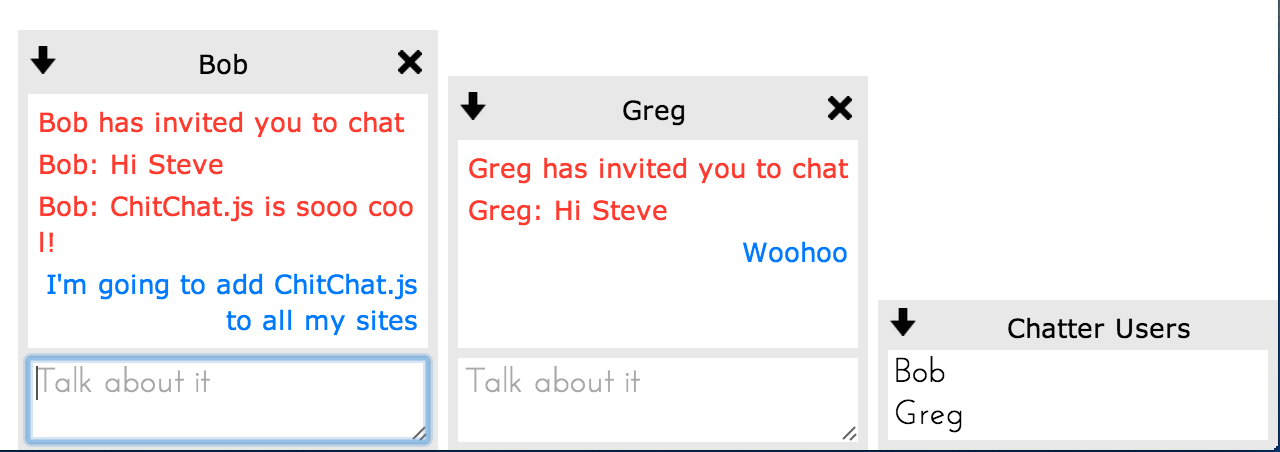
Screenshots:
This is the default look – I was inspired by a retro AOL Instant Messenger but it’s easy to modify the look using CSS. Instructions are in the Github repository.
Let me know if you use this on your site, would love to see this kind of functionality on more sites that I visit. Also, would gladly work with anyone on Pull Requests if you’re interested in contributing!
Regards,
Kyle